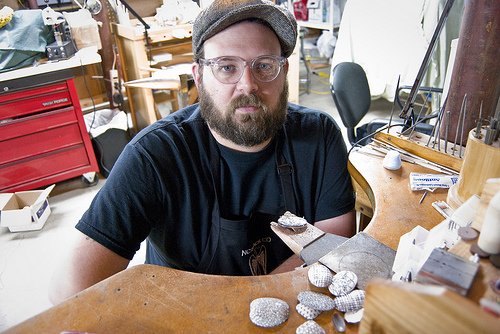
My name is Arthur Hash. I work as professional faculty in the Metal program here at the State University of New York at New Paltz. For the last ten years I have been incorporating digital processes (laser engraving, water-jet cutting, 3D printing and CNC milling) into my studio practice. At an early age I was exposed to computers, mostly video games. In high school, as part of a technology and design class, I was encouraged to experiment with AutoCAD (a 3D digital drafting program). Years later, I find myself using CAD software as a sketching tool. I use it everyday, sketching out objects in virtual space.
In the world of 3D digital modeling, surfaces are comprised of small polygons or facets. I view these facets as almost a resolution for 3D objects. It is very similar to digital images. A high resolution digital photo may have 600 ppi or pixel per inch where as a low resolution images might have a lower count. Maybe around 72 ppi. In 3D digital modeling, a HIGH resolution 3D digital surface may have up to 300,000 polygons or more. By increasing the number of polygons the surface becomes smoother and smoother. A lower polygon count produces a faceted object. For example, picture the facets on the surface of a soccer ball. If we double the polygon count then it is more like the divots in a golf ball. Double it again. Now the surface is more like texture of an orange. Once doubled again the surface might be completely smooth not noticeable by the human eye.
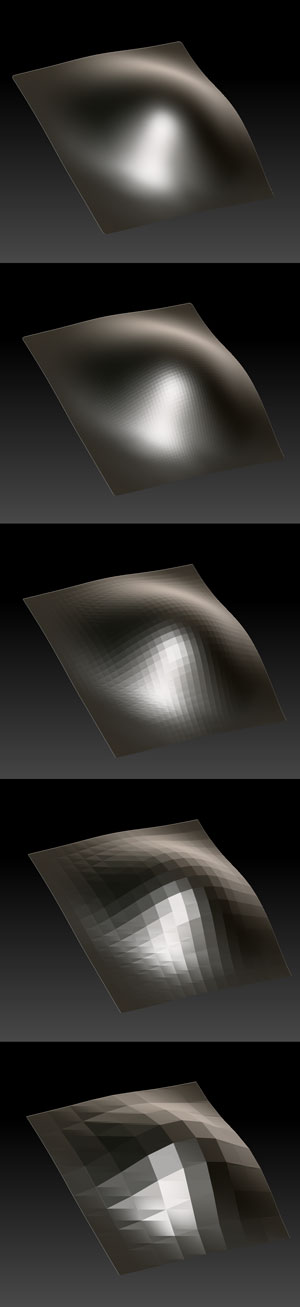
Using a laser engraver I have started a new body of work. I consider these pieces miniature, wearable “drawings”. They are flat projections of 3D digital surfaces. The polygon count has been reduced and the result is an etching that creates a jewel-like faceted surface on the enamel.
The heat of the laser, which burns the enamel at around 2500 degrees Fahrenheit actually “selectively over-fires” the enamel, vaporizing the silica. The result is a black line that is recessed into the enamel leaving a texture. The part of the enamel that is left retains its shine from the original firing.
I have made this short video to show you how the laser works when etching enamel on copper.
For more information please visit my website and blog. I look forward to posting more images and videos.

Hi Arthur, Thanks for posting the great video. I enjoyed looking at your website and other videos too. It is great to see a contemporary tool being used in the conjunction with an ancient material like enamel. It just shows the endless potential for vitreous enamel to be rejuvenated and have its boundaries pushed further. This surface engraving strikes me as being in a way is a reverse of ‘engine turning’, used so effectively by Faberge in the late 19th Century.
Your mathematical / geometric digital drawings are intriguing also. The samples I posted utilize embossed pattern based on dots and grids fired over with transparent enamel. I worked a great deal with early CAD software in ’96 transferring pattern from screen to metal via photo-etching. I will post some images if I can find some tonight.
Your direct approach is very appealing. Are you interested to keep combining it with other types of enamel process?
p.s I recently was given one of your Coffee stain brooches from the AJF- I enjoy wearing it very much.
all the best
Stephen
Great to hear. I have also done extensive research with enamel inlay. I have etched away the material to leave recesses in the enamel and then packed and re-fired and then stoned. So far the results are less than prefect. I am still working on it. I Love your patterns. I have also started using the laser to etch paint from copper. This gets put into a saltwater etching bath. The results are kind of nice. The results seem right up your alley.
http://theartescapeplan.blogspot.com/2011/04/electro-etching.html
So much to do so little time.
Arthur, re. your new work you may be interested in a silversmith, Kathryn Hinton, who has developed a ‘digital hammer’. She is currently an artist in residence for a year with us at edinburgh college of art, art of edinburgh University. I first saw her work when I was her external examiner at the rca and the use of facets from polygon meshes is part of her vocabulary http://www.kathrynhinton.com/digital/digital.html
Of curse if you write the code to create different shapes than polygons and triangles then you are into the realm of Drummond Masterton:
http://www.autonomatic.org.uk/team/dm/tessellation.html
Amazing. Thanks!
Hi, Arthur,
really interesting to read about your processes and yes, so many ideas and so little time. I was also thinking of experimenting with laser etching away larger areas and then re-packing with enamel. We have laser cutters in the faculty, which, just like yours, I am sure, can cut and engrave with very fine lines or bit map engrave. But we also have a ‘laser engraver’, a huge machine, which produces slightly coarser qualities and thicker lines. The laser engraver produces the textured line as you mentioned in your blog. I have shied away from this machine so far, mainly because of its slightly cruder nature, but of course that could be the ‘user’, me, not exploring enough and being methodical with the settings. Well, it is now going to be on my list; thanks for inspiring me to continue to experiment and reminding me of ideas I haven’t followed up. It will be good to see your work in ‘real life’ in Phoenix. I am looking forward to it. Do you use a cutter or engraver?
Beate xx
Our laser is a cutter/engraver. It is a smaller table top model. It is about 40Watts which will cut and engrave plexi, paper, cardboard, enamel, leather, fabrics wood and foam. It will not cut or engrave metal. It will mark metal with the help of a ceramic spray, which is more or less like a power coating or enamel. The best part is that there is a lot of user control. The company is called Jorlink. http://www.jorlink.com I have used their larger models as well. Part of my last job was working for VCU (Virginia Commonwealth University) in Sculpture and Printmaking. In Printmaking I set up a larger more powerful model for making print blocks in hardwoods. We had a Cintiq 24HD Pen Display attached to the laser workstation. The students could do digital drawings in Illustrator and then transfer it to the block with the laser to pull prints from.
I also have done a bit of this myself.
http://vimeo.com/32286954
Thanks Arthur for the amazing posts and your links, and Stephen for yours too. The engagement of these tools in this manner is something I can only dream of, but I will be watching the outcomes of everybody’s research with great interest. Fantastic!